
Mini Blue
Tools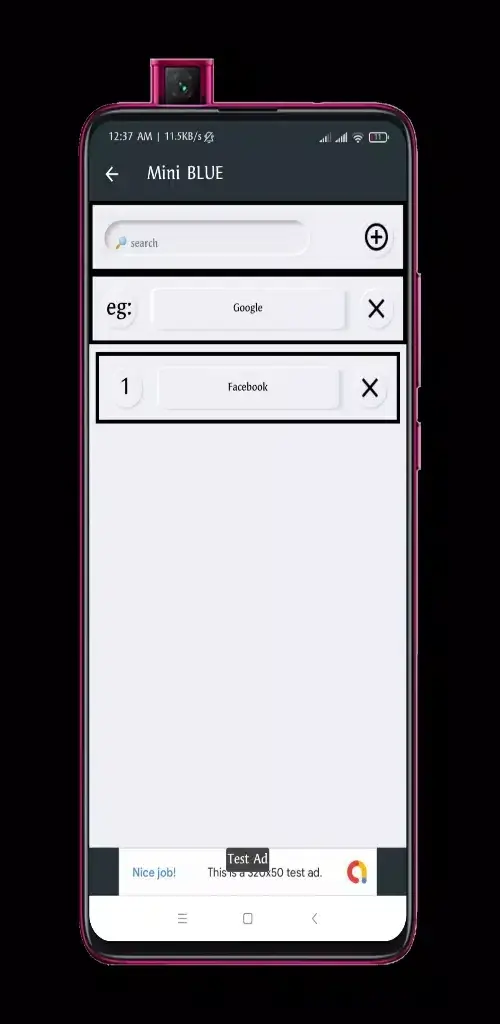

Mini Blue is a lightweight Android utility designed to store and organize web links in one place. Whether you stumble upon an article, a video, or any online resource, the app lets you capture it with a single tap and retrieve it later without digging through browser history.
At just 8 MB, Mini Blue focuses on speed and simplicity, making it suitable for devices with limited storage. This page provides the latest version details, installation guide, and practical tips for safe use.
Quick Information
| App/Game Name | Mini Blue |
| Latest Version | 7.1 |
| Developer | Not listed |
| Category | Apps / Tools |
| App Size | 8 MB |
| Package Name | com.bluemini.hzt |
| Last Updated | 17 November 2025 |
What Is Mini Blue?
Mini Blue functions as a personal link vault. After installing, you can add URLs directly from the share menu of any browser or app. The saved entries appear in a clean list, sortable by date or custom tags you assign. The app does not include built‑in browsing or content preview, keeping the footprint small and the experience straightforward.
The tool targets users who need a quick way to bookmark items on the go, without relying on cloud‑based services or heavyweight note‑taking apps. Because it operates offline, your saved links remain on the device unless you choose to export them.
Compatibility
| Android Version | ✓ Verified — 5.0 and up |
| Architecture (ARM64 / 32-bit) | Not Verified |
| Internet Connection | ✓ Verified — May be required for ads, updates, or login |
| Storage Needed | Not Verified |
| OBB/Data Files | Not Verified |
| Root Required | Not Verified |
How to Install
- Download the Mini Blue APK file to your Android device.
- Before installing, go to Settings → Security (or Privacy) → Install unknown apps and enable the source (e.g., your browser or file manager).
- Open the downloaded APK and tap Install.
- Once installation finishes, launch Mini Blue from the app drawer.
- If you already have an older version installed, the installer will prompt you to replace it – confirm to keep your existing data.
Troubleshooting
- App not installed error: Ensure the APK is complete (no partial download) and that your device allows installations from unknown sources.
- Crashes on launch: Verify that you are running Android 5.0 or newer; older versions may lack required libraries.
- Saved links not appearing: Check that the app has storage permission enabled in Settings → Apps → Mini Blue → Permissions.
- Unable to add new links: Make sure the sharing source (browser, social app) is correctly passing the URL to Mini Blue.
Safety & Security
Mini Blue is a standard APK without official store verification, so download it only from a trusted source. After installation, review the permissions it requests; the app typically needs access to device storage to save a simple text list of URLs. Avoid entering personal credentials or sensitive data within the app, as it does not provide encryption or cloud backup.
Because the app is not signed by a known developer, future updates may require reinstalling the APK, which could overwrite saved data if you do not back up the link list manually.
How Mini Blue Compares
| Feature | Mini Blue | Raindrop.io | |
|---|---|---|---|
| Price / Model | Free | Free with optional Premium | Free tier, paid plans for extra features |
| Platform | Android only | Android, iOS, Web | Android, iOS, Web, Desktop extensions |
| Standout Feature | Ultra‑lightweight, offline storage | Read‑later with offline article view | Rich tagging, visual collections, cloud sync |
| Best For | Users who want a simple, local link list | People who read articles offline frequently | Power users needing organized, searchable bookmark libraries |
Alternatives
- Pocket – Saves articles for offline reading and syncs across devices.
- Raindrop.io – Offers visual bookmark collections, tags, and cloud backup.
- Google Keep – General note‑taking app that can store links alongside other content.
- Bookmark Manager (by Google) – Integrated with Chrome, provides simple cloud‑based bookmark syncing.
Final Verdict
Mini Blue is an excellent choice if you need a no‑frills, offline link saver that stays under 10 MB. It works well on most modern Android devices and requires minimal permissions. However, it lacks cloud sync, advanced tagging, and reading‑mode features found in more feature‑rich competitors. Consider your priorities: for pure local storage, Mini Blue fits the bill; for richer organization or cross‑device access, a service like Pocket or Raindrop.io may be preferable.
Frequently Asked Questions
Mini Blue is a standard APK; install it only from a trusted source and review the permissions it requests, mainly storage access.
The latest version available is 7.1, released on 17 November 2025.
Mini Blue works on Android 5.0 (Lollipop) and later; it does not specifically require Android 15.
No, Mini Blue is a single‑APK app and does not require extra OBB or data packages.
This can happen if the APK is incomplete, if unknown‑source installations are blocked, or if your device runs an Android version older than required.
Yes, installing the new APK will replace the existing version while preserving your saved links, provided you keep the storage permission enabled.
Older versions are not listed here; you would need to locate a reputable archive if you specifically need a previous release.
Mini Blue stores links locally on the device only; it does not offer cloud sync or cross‑device backup.